Playful productivitystudents · teams · classes · families

Lumina: your to-do list, habits and calendar in one playful app.

The Lumina app brings together a to-do list, a habit tracker, notes, Google Calendar, a Pomodoro timer and shared groups. Streaks, levels and companions keep you on track — on your own or together.

  • Free
  • No ads
  • Works offline
  • Android, iPhone and PC
Screenshot of the Lumina app
41 daysBest streak
62%of your day
App icon matching the theme
In short

What is Lumina?

Lumina is a free app that replaces several productivity apps: a to-do list with recurring tasks, a habit tracker with streaks, linked notes, your Google Calendar and a Pomodoro timer. Use it on your own or with a group (class, team, club, family). It works offline, without an account and without ads.

  • Android + web app
  • iPhone, iPad, Mac, PC
  • 6 languages
  • No account required
  • Free sync
  • 9 themes
The essentials

Tasks, habits and notes, finally in one place

Everything that matters in your day on one screen: check off, plan, connect your ideas.

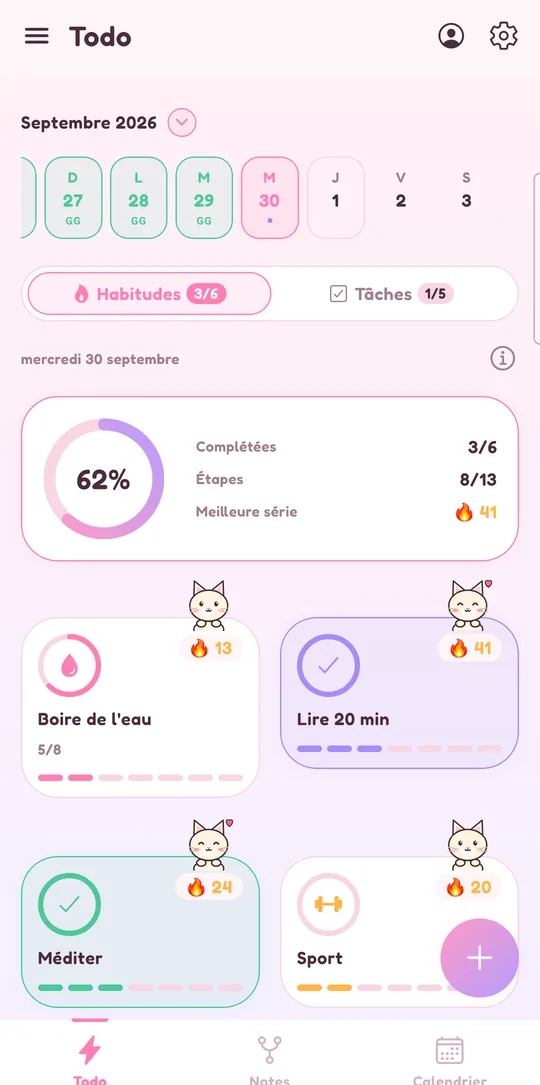
Habit tracking with streaks in Lumina, Sakura theme

A habit tracker that keeps you going

Build routines that stick and watch your streaks grow.

  • Every day, some days, every N days or N times a week
  • Daily goal (e.g. 8 glasses of water) and several reminders
  • Streaks, weekly progress and streak freezes
  • Icon, color and a motivation line
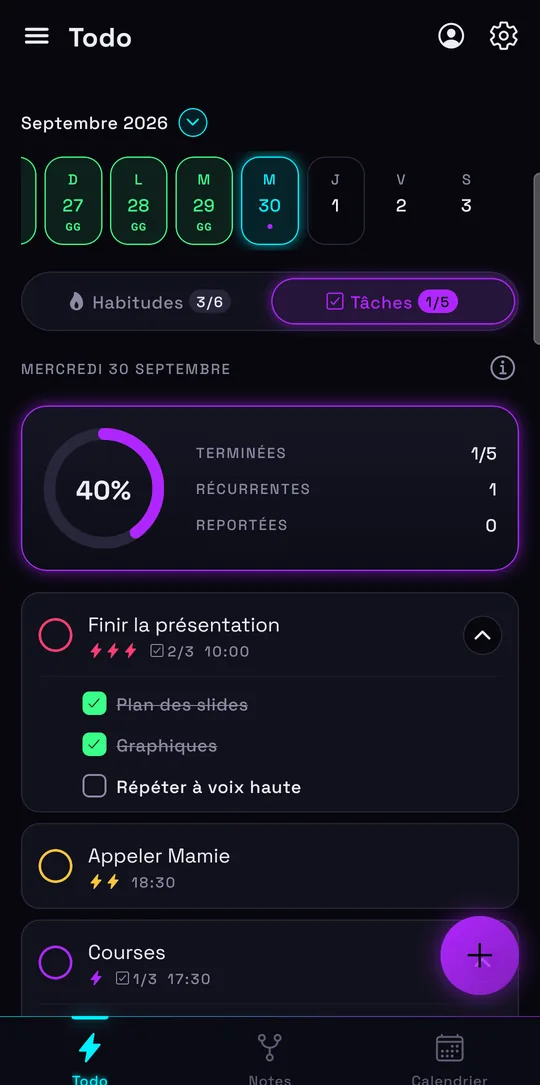
Today’s to-do list in Lumina, Neon Night theme

A complete to-do list

Plan your day with a date, time and priority — or no date at all.

  • Subtasks, notes and three priority levels
  • Repeats like Google Calendar: every N days, weeks, months, the 2nd Monday…
  • Undated tasks that wait for you without ever being late
  • Quick add: “tomorrow 6pm call grandma !!”
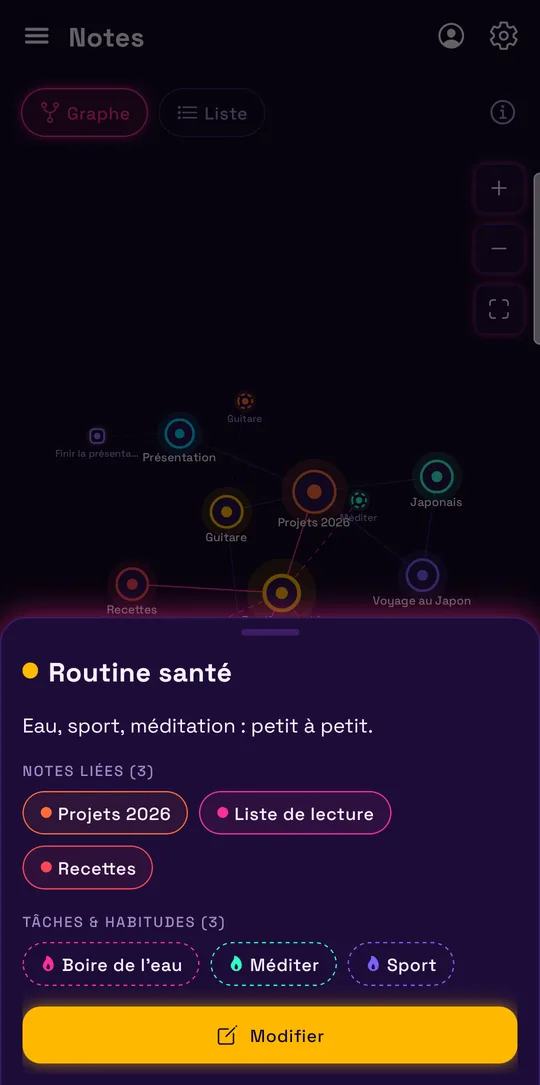
Graph of linked notes in Lumina, Synthwave theme

Linked notes (second brain)

Connect notes to each other, to your tasks and to your habits.

  • A graph to see every link, or a simple list
  • A note can hold tasks and habits
  • Everything stays tied to your day
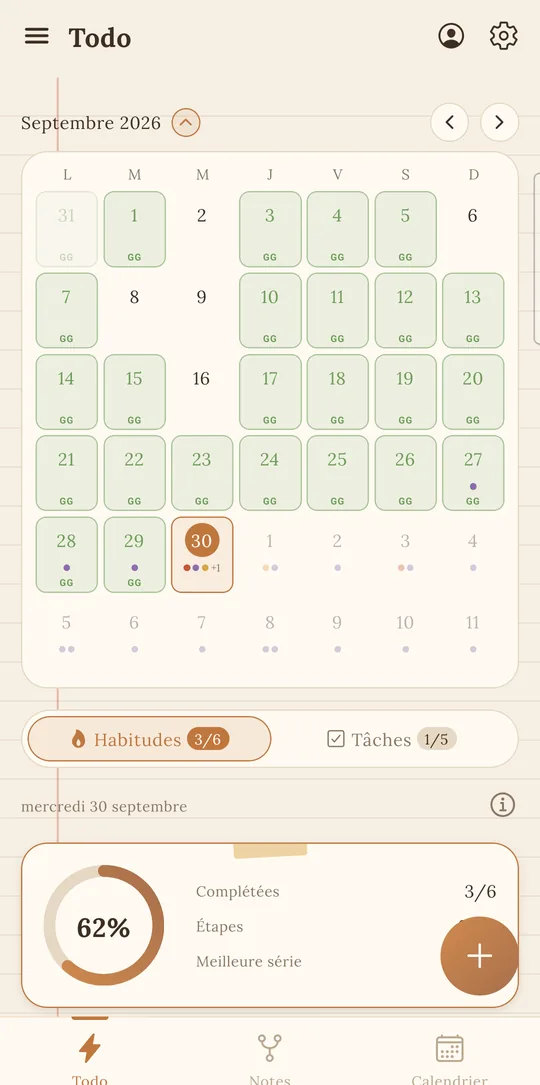
Google Calendar month view in Lumina, Latte theme
Google Calendar built in

Your calendar next to your tasks

Your Google events and dated tasks show up in the same calendar. Create, edit, move and delete your events without leaving Lumina. It’s all explained on the to-do list linked to Google Calendar page.

  • Day
  • 3 days
  • Week
  • Month
  • Schedule
  • Drag and drop to move an event
  • Search and keyboard shortcuts on desktop
  • Several Google accounts and shared calendars (Pro)
Focus and progress

Focus, then see how far you’ve come

A timer to get going, numbers to understand, rewards to keep at it.

Pomodoro timer

Focus cycles with short and long breaks, linked to the task at hand.

Statistics

Completion rate, best streaks, perfect days and week-by-week trends.

Levels and achievements

Earn XP with every check-in, level up and unlock 16 achievements. Your companions earn a star, a crown and an aura.

Streak freezes

One missed day no longer breaks your streak: two freezes a month with Pro.

Your profile

A profile that looks like you, badges to collect

Banner, photo decoration and badges: show your progress to the members of your groups.

Custom profile

Name, bio, illustrated banner and a decoration around your photo.

Bronze, silver, gold badges

Every achievement you unlock becomes a badge on your profile.

Tickets

Earned with achievements, levels and streaks — and every month with a subscription.

Shop and limited editions

Year-round decorations and seasonal editions: Halloween, Christmas, Valentine’s Day, Easter, summer.

Shared groups

A shared to-do list for your class, team or family

Create a group, invite people by email or link, share tasks and see who finished what. Everyone has a role: owner, admin, editor or viewer.

  • Classes
  • Teams
  • Sports clubs
  • Families
  • Roommates
  • Projects

Students and classes

Shared homework, due dates, class organization.

Companies and teams

Today’s assignments, priorities and progress per member, without the overhead.

Clubs and sports

Training sessions, games and team tasks.

Families

Groceries, chores and the week’s appointments.

And also

Everything you need to keep the pace

Android widgets

Habits, Tasks and Today on your home screen: check off without opening the app.

Reminders and evening recap

Silent or sound reminders, and in the evening, what’s left to do.

Offline, no account

Everything works without a connection; your data stays on your device.

Free sync

Sign in with Google to find everything on all your devices.

Import from Todoist and Google Tasks

Bring your existing tasks in one file, without duplicates.

Natural language input

The date, time and priority are read from the task title.

6 languages

English, French, German, Spanish, Italian and Portuguese.

Holiday themes

Colors and decorations for Halloween, Christmas and New Year.

Export anytime

All your data in one file, whenever you want.

No ads, nothing sold

No advertising, no data sold. Ever.

Gift and referral

Give Lumina Pro to someone, or refer friends and earn a commission.

Matching app icon

The app icon changes with your theme.

One app instead of five

What Lumina replaces

No more juggling a to-do list, a habit tracker, a notes app, your calendar and a timer.

You’re looking for…In Lumina
A to-do list or task managerDaily tasks, subtasks, priorities, repeats and undated tasks
A habit trackerStreaks, daily goals, flexible frequencies, reminders and widgets
A student planner or calendarGoogle Calendar built in: day, 3 days, week, month, schedule
A notes appNotes linked in a graph, tied to your tasks and habits
A Pomodoro timerFocus mode with cycles and breaks, linked to a task
A shared to-do listGroups with roles, invitations and progress per member
A motivating productivity appLevels, achievements, badges, companions and 9 themes

Looking for a Todoist alternative or a Habitica alternative? Our comparisons also say when to keep your current app.

An app that feels like you

9 themes, 3 styles. Try them here.

Tap a theme: this page switches to it right away, just like the app. Each theme has light and dark modes, its own fonts, its companion and a matching icon.

Companions: cats, dinos, foxes, bunnies, pandas, robots, bears, owls, hedgehogs, ghosts…

Pricing

Free for the essentials. Unlimited for the rest.

No commitment, cancel anytime. 7 days of Pro free when you create your account.

Free

The essentials, sync included.

€0
Forever
  • 3 habits
  • 10 tasks a day, unlimited subtasks
  • Linked notes (2 hubs, 15 ends)
  • 1 group created, unlimited groups joined
  • Base kit of every theme
  • Google Calendar and sync
Get started
Student price

Student

All the essentials, student price.

€19.99 /year
That’s €1.67 a month
  • Everything in Free
  • Unlimited habits, tasks and notes
  • Unlimited groups
  • All themes, backgrounds, companions and icons
  • 100 tickets a month
Choose Student

Pro

To organize everything, life and work.

€39.99 /year
That’s €3.33 a month
  • Everything in Student
  • All your Google calendars: shared, work, family…
  • Advanced statistics
  • Streak freezes
  • 150 tickets a month
Choose Pro

For a team or a class

Pro for you and the members of the groups you create.

Team

Pro for 10 people, you included.

€79.99 /year
That’s €6.67 a month
  • Pro for you and 9 members
  • Shared tasks and progress per member
  • Great for a team or a club
Choose Team

Class

Pro for 35 people, you included.

€149.99 /year
That’s €12.50 a month
  • Pro for you and 34 members
  • Shared homework and due dates
  • Great for a teacher or a club
Choose Class

On Android, subscriptions go through Google Play; on the web app, by card (Stripe). Your plan follows you on all your devices. You can also give Lumina Pro (1 month or 1 year) with a gift code.

FAQ

Frequently asked questions

What is Lumina?

A free, playful productivity app that combines a to-do list, a habit tracker, linked notes, Google Calendar, a Pomodoro timer and shared groups. It’s on Android (Google Play) and the web, in 6 languages.

What’s the best free app to track habits and tasks?

Lumina does both in one app, for free and without ads: a habit tracker with streaks, goals and reminders, and a to-do list with subtasks, priorities and repeats. No need for two separate apps.

Does Lumina work on iPhone?

Yes, as a web app: open lumina-app.me/app in Safari, then “Add to Home Screen”. It also works on iPad, Mac and PC in the browser, and on Android with the Google Play app.

Is Lumina really free?

Yes. The free version covers the essentials — habits, tasks, notes, Google Calendar and sync — with no ads and no time limit. Student and Pro unlock unlimited use, every theme and advanced features.

Do I need an account?

No. Lumina works without an account and offline: everything stays on your device. Google sign-in is only used to sync your data, show your Google Calendar and use groups.

Can I share a to-do list with a group?

Yes. Create a group (class, team, club, family), invite members by email or link, and share tasks with subtasks. Editors see who finished each task.

Does Lumina have a Pomodoro timer?

Yes. Focus mode runs focus cycles with short and long breaks, and can be linked to a task you complete at the end.

Can I create recurring tasks?

Yes, like in Google Calendar: every N days, weeks, months or years, on some weekdays, on the n-th day of the month, with an end date or a number of times.

Can I import my tasks from Todoist or Google Tasks?

Yes. In settings, import the CSV export of a Todoist project or the Tasks.json file from Google Takeout. Tasks already imported are not added twice. The comparison with Todoist details what comes across.

Which languages are available?

English, French, German, Spanish, Italian and Portuguese. The app follows your phone’s language, and you can change it in settings.

How do levels, badges and tickets work?

Every habit checked and every task completed earns XP. Levels and the 16 achievements give badges and tickets, which you trade for profile decorations in the shop.

What do you do with my data?

Nothing but sync it if you sign in. No data is sold, no ads. You can export or delete your data at any time. Details in the privacy policy.

How do I cancel my subscription?

On Android: Google Play, then Payments and subscriptions. On the web app: Premium screen, then Manage my subscription. You keep your plan until the end of the paid period.

How do I delete my account?

In the app: Settings, then Delete my account. Deletion is immediate. All the options are on the Delete my account page.

A question or an idea?

Write to us at [email protected], we read everything.
The most playful way to win your day

To-do list, habits, notes, calendar, focus and groups. Free, no ads, on Android, iPhone and desktop.

Page updated on November 7, 2026.