Habit tracker: the habit tracking app that makes you want to keep going
Drink water, read for 10 minutes, work out three times a week… Lumina is a free habit tracker that turns your good resolutions into small daily wins: you check off, your streak grows, and you really don’t want to break it.
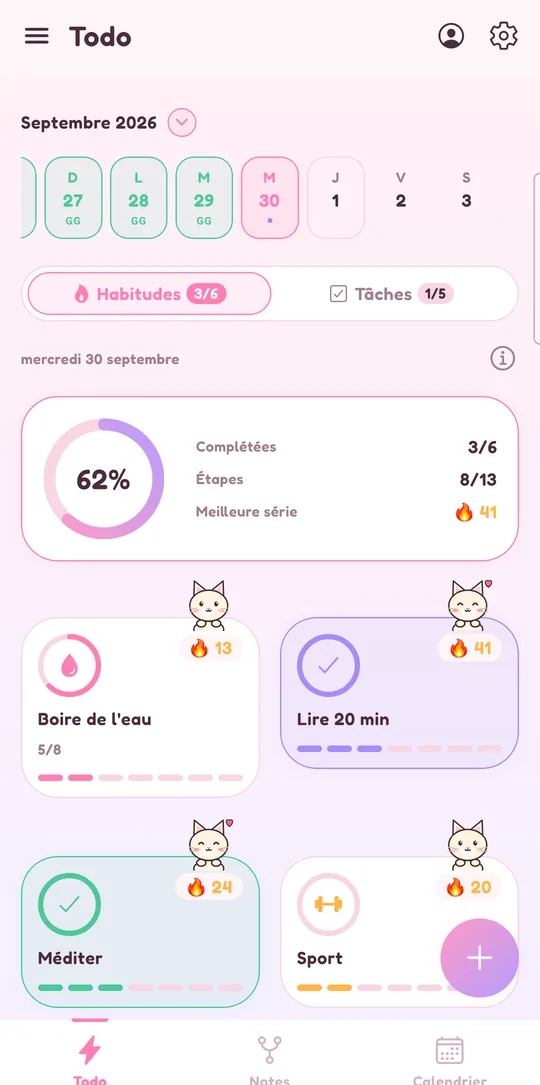
How habit tracking works in Lumina
In Lumina, a habit is a small action you want to repeat regularly. The app tracks it day after day and counts your streak to keep you motivated. Setting it up takes less than a minute:
- Tap the + and give your habit a short name (“Read for 10 minutes”).
- Pick an icon, a color and the days it’s scheduled.
- Set the daily goal, for example 4 glasses of water, and add reminders if you want.
- Tap the card to check off a step: today’s progress moves forward and your streak grows.
No endless forms, no spreadsheet to fill in: one tap per step, that’s it. That’s exactly what makes a habit last.
Streaks and goals that keep you motivated
The heart of a good habit tracker is visual feedback. In Lumina, every habit shows its current streak: seeing “12 days” gives you a concrete reason not to drop day thirteen.
- Daily goal: a habit can take several check-offs (4 glasses of water, 3 stretching breaks).
- Scheduled days: your workout can be scheduled on Monday, Wednesday and Friday only, not every day.
- Themes and companions: 9 themes, backgrounds and companions so checking off stays a small pleasure.
The playful side isn’t a gimmick: when a tool is nice to open, you open it more often, and that’s what really changes your days.
Reminders, widgets and an evening recap so you forget nothing
A forgotten habit is often just a habit nobody reminded you of at the right time. Lumina takes care of that:
- Several reminders per habit, silent or audible (for example 9 a.m., noon, 3 p.m. and 6 p.m. for water).
- An evening recap of what’s left to do.
- Habits, Tasks and Today widgets on Android: check off from your home screen, without opening the app.
On iPhone, iPad, Mac or PC, you use the web app, installable from your browser, with the same habits once you sign in.
Habit tracking that’s really free
The free version of Lumina lets you track 3 habits, with no ads and no time limit. Three is a good number to start with anyway: better three habits you keep than ten you drop after a week.
The app works offline and without an account: your data stays on your device. If you sign in with Google, sync across devices is free too. And you can export your data at any time.
Need more? The Student plan (€19.99 a year or €2.49 a month, no commitment) unlocks unlimited habits, tasks and notes, plus every theme.
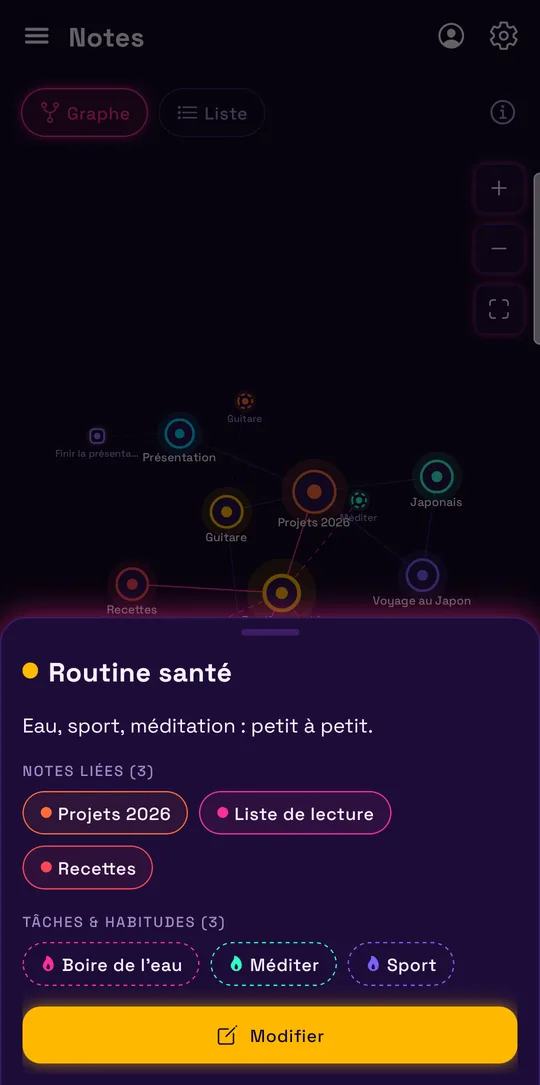
Your habits linked to the rest of your day
Lumina is more than a habit tracker. Your habits live next to your to-do list and Google Calendar, and your notes can link to them: a “Goals for the year” note linked to your Workout and Reading habits, for example, shown in the notes graph.
Studying for exams? The student planner shows how to combine study habits and homework. And to motivate a whole club or class, shared groups take over.
Already using a habit app built like a role-playing game? Our comparison with Habitica also says when to keep it.
Frequently asked questions
Is Lumina a free habit tracker?
Yes. The free version lets you track 3 habits with streaks, daily goals, reminders and sync, with no ads. The Student plan (€19.99 a year or €2.49 a month) makes habits unlimited.
Can I check off a habit several times a day?
Yes. You set a daily goal (for example 4 glasses of water): each tap on the card checks off one step, and you can schedule several reminders for the same habit.
Are my habits saved if I change phones?
Without an account, they stay on your device. Sign in with Google (free) to sync them and find them on your other devices. You can also export your data at any time.
Does the habit tracking app work on iPhone?
Yes, with the web app: open lumina-app.me/app in Safari, then tap “Add to Home Screen”. There’s no App Store app, but the web app installs like an app.
Can I check off my habits without opening the app?
On Android, yes: the Habits and Today widgets let you check off right from your home screen.
Other ways to get organized
Organize your studies
Homework, studying and classes in a student planner linked to Google Calendar.
Share a to-do list
A group task list for your class, your team, your club or your family.
Bring tasks and calendar together
Your dated tasks and Google Calendar events in the same calendar.
Discover Lumina
Every feature, the 9 themes and the app’s pricing.
Ready to try it? It’s free.
No ads, no account required, on Android and in your browser.