TickTick alternative: what really changes
TickTick already brings a lot together: tasks, habits, a Pomodoro timer, a calendar and shared lists, with apps for nearly every device. Lumina covers some of the same ground with different choices: notes linked as a graph, groups with roles, a stronger playful side and a Student plan. Here are the differences, including what Lumina doesn’t do.
The short answer
If TickTick works for you, there’s no urgent reason to switch: the two apps overlap a lot. Keep it if you sort everything into lists, tags and filters, if you want a native app on iPhone, Mac or PC, or if your calendar isn’t Google Calendar.
Lumina is worth a try if you want notes linked to your tasks and habits, groups with roles for a class or a team, a bigger game side, or a low student price with no proof needed. Both have a free version: try Lumina for a week next to TickTick.
Lumina and TickTick, side by side
| Criterion | Lumina | TickTick |
|---|---|---|
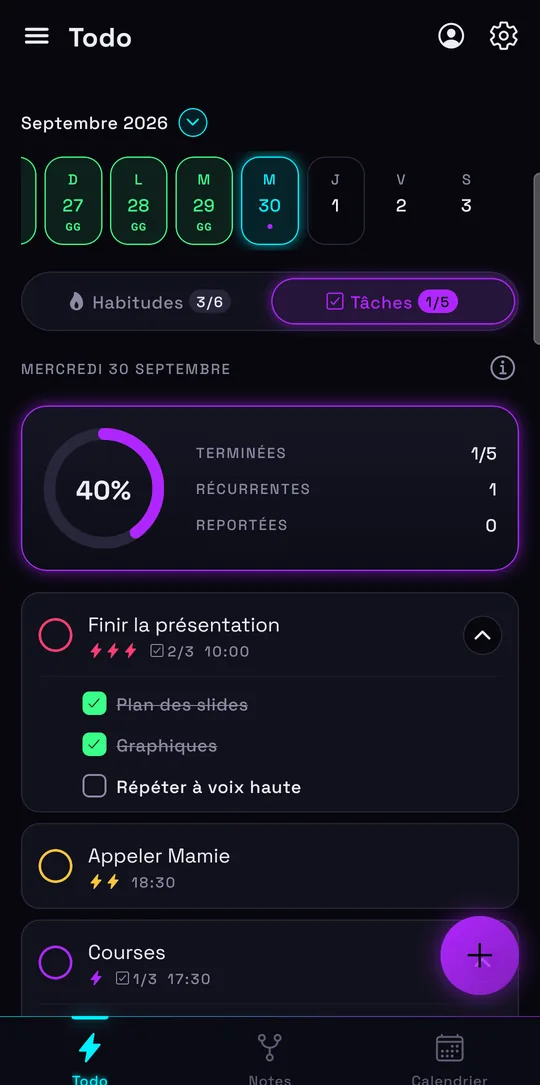
| Free version | No time limit, no ads: 3 habits, 10 tasks per day, 1 group created | 9 lists, 99 tasks and notes per list, 2 reminders per task, 5 habits |
| Individual plan | Student: €2.49 a month or €19.99 a year. Pro: €4.99 a month or €39.99 a year | Premium: $49.99 a year. Education offer: $37.99 for the first year, with a school email address |
| Plan for several people | Team (10 people): €9.99 a month. Class (35 people): €19.99 a month | No team plan on its pricing page; only the owner of a shared list needs Premium |
| Organization | By day, with time, priority, subtasks and recurrence. No lists or tags | Lists, tags, filters, list, Kanban and timeline views, Eisenhower Matrix |
| Habits | Streaks, daily goal, several reminders, streak freezes with Pro | Frequency, numeric goal, gallery of 60+ habits; 299 habits with Premium |
| Calendar | Google Calendar in seven views; create, edit, move and delete events; main calendar for free, all of them with Pro | Two-way Google Calendar sync, plus Outlook, iCloud, Exchange and CalDAV; basic views for free, all of them with Premium |
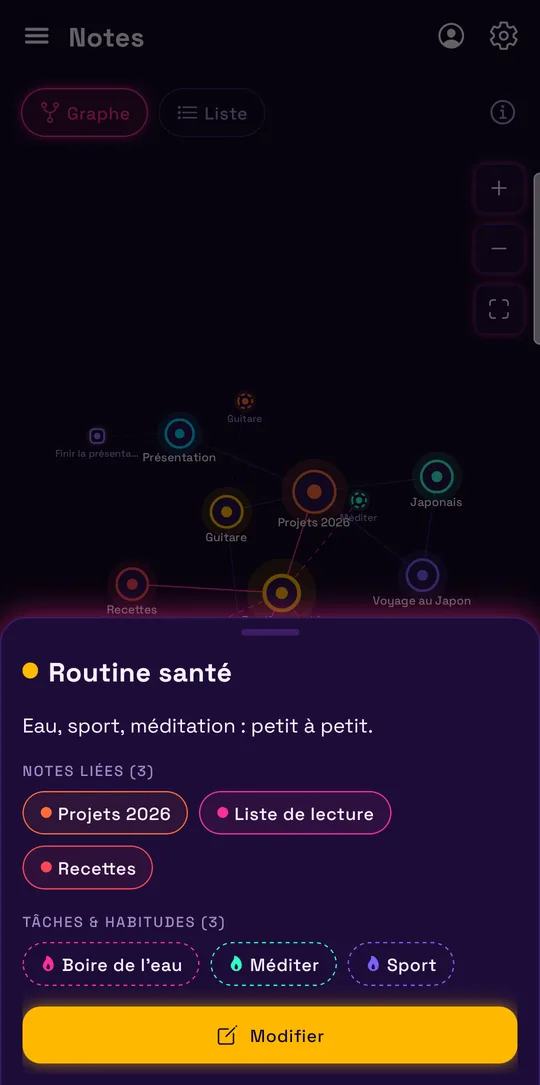
| Notes | Notes linked to each other, to tasks and to habits, as a graph or a list | Notes kept in lists, next to tasks |
| Focus | Pomodoro timer tied to a task | Pomodoro timer with white noise and a distraction log |
| Working together | Groups with roles (owner, admin, editor, viewer) and per-member progress; Google sign-in required | Shared lists and assigned tasks: 2 members per list for free, 29 with Premium |
| Devices | Android and web app (iPhone, iPad, Mac, PC in the browser) | iPhone, iPad, Android, Windows, Mac, Linux, web, browser extension, Wear OS watch |
| Input and AI | Quick add reads the date, time and priority from what you type. No AI, no voice input | Natural-language input, voice input; AI features with Premium |
| Playful side | XP, levels, achievements, companions, decoration shop, 9 themes | Achievement score over 12 levels; basic themes for free, all of them with Premium |
TickTick’s prices are those of its official pages on November 7, 2026, in US dollars, and may change or vary by country. The links are at the bottom of this page.
When to keep TickTick
TickTick already does much of what Lumina offers. It stays the better choice in these cases:
- You organize everything in lists. Lists, tags, filters, Kanban, timeline and the Eisenhower Matrix: Lumina simply sorts your tasks by day.
- You want native apps everywhere. TickTick has apps for iPhone, iPad, Windows, Mac and Linux, a browser extension and a Wear OS app. Lumina isn’t on the App Store: on those devices, it’s the web app.
- Your calendar isn’t with Google. TickTick also shows Outlook, iCloud, Exchange and CalDAV. Lumina only handles Google Calendar.
- You track more than 3 habits without paying. TickTick’s free version allows 5, Lumina’s allows 3.
- You rely on voice or AI. TickTick offers voice input and AI features. Lumina has neither.
- You like white noise during a Pomodoro. TickTick’s timer has it and logs your distractions; Lumina’s stays simple.
When Lumina is the better fit
Lumina makes sense if you want more than a well-sorted task list:
- Your notes need to connect. In Lumina, a note links to other notes, to a task or to a habit, and the whole thing shows up as a graph.
- You run a class, a club or a team. Groups have roles (owner, admin, editor, viewer) and show who finished what. Creating one group and joining as many as you want is free. The Team and Class plans give Pro to the whole group.
- The game keeps you going. XP, levels, achievements, companions that grow and a decoration shop: Lumina goes further than an achievement score.
- You’re a student. Student costs €19.99 a year, with no proof required and no ads. See the student planner.
- You want a Google Calendar you can edit for free. Seven views (Day, 3 days, 4 days, Week, Month, Year, Schedule) and your main calendar at no cost. More on the to-do list with Google Calendar page.
- You don’t want an account. Lumina works offline and without signing up. Google sign-in is for sync, the calendar and groups.
Lumina comes in 6 languages: French, English, German, Spanish, Italian and Portuguese.
Moving from TickTick to Lumina
Lumina imports from Todoist and Google Tasks, not from TickTick: you recreate what you want to keep. Here’s how to go about it:
- In TickTick on the web, open your account settings and generate a backup (under Backup & Import). Lumina can’t read that file, but you keep a copy of everything.
- Start with your upcoming tasks, using quick add: “tomorrow 6pm call grandma !!” sets the date, time and priority in one go.
- Recreate your habits with their daily goals. The free version tracks 3: start with the ones that matter most, or see the habit tracker.
- For a shared list, create a group and invite the members by email or link.
Good news for your calendar: if you had subscribed TickTick to Google Calendar, your events are already in Google Calendar and show up in Lumina as soon as you sign in with Google. Tasks that TickTick sent to Google Calendar appear there as events, not as Lumina tasks.
Sources and date checked
Information about TickTick checked on November 7, 2026, on its official pages. TickTick is a trademark of its owner, unrelated to Lumina.
Frequently asked questions
Can I import my TickTick tasks into Lumina?
No. Lumina imports from Todoist and Google Tasks, not from TickTick. You recreate your tasks and habits by hand; your Google Calendar events, though, show up in Lumina as soon as you sign in with Google.
Is TickTick free?
Yes, with a free version limited to 9 lists, 99 tasks and notes per list and 5 habits. Premium costs $49.99 a year according to its pricing page on November 7, 2026.
Which is cheaper for a student?
Lumina Student costs €19.99 a year, with no proof required. TickTick gives 25% off one year of Premium, so $37.99, to students and educators with a school email address.
Does Lumina have an iPhone app like TickTick?
Not on the App Store. On iPhone, open lumina-app.me/app in Safari, then tap “Add to Home Screen”. If you want a native app on iPhone, Mac, Windows or Linux, TickTick meets that need better.
TickTick already has habits and a Pomodoro timer: why switch?
You don’t have to. If TickTick suits you, keep it. Lumina stands out with notes linked as a graph, groups with roles, its game side (XP, companions, achievements) and its Student price.
Other ways to get organized
Compare with Todoist
Pricing, habits, calendar and import: what changes, and when to keep Todoist.
Compare with Habitica
A role-playing game or your whole day in one place: what changes, and when to keep Habitica.
Compare with Microsoft To Do
Outlook, habits, Google Calendar and sharing: what changes, and when to keep To Do.
Compare with Google Tasks
Calendar, import and habits: what changes, and when to keep Google Tasks.
Compare with Notion
Notion for your docs and wiki, Lumina for your to-do list, habits and calendar.
Track your habits
Streaks, daily goals, reminders and widgets: a free habit tracker that keeps you going.
Bring tasks and calendar together
Your dated tasks and Google Calendar events in the same calendar.
Discover Lumina
Every feature, the 9 themes and the app’s pricing.
Ready to try it? It’s free.
No ads, no account required, on Android and in your browser.