Notion alternative: a simpler app for your tasks and habits
Notion is a very flexible workspace: pages, databases, wikis, docs and thousands of templates. Yet plenty of people open it just for a to-do list or a habit tracker, and spend time building the tool before they get to use it. Lumina works the other way round: tasks, habits, linked notes and Google Calendar are ready the moment you open it. Here’s what really changes, including what Lumina doesn’t do.
The short answer
If you write docs, keep a wiki, build databases or share your team’s knowledge, keep Notion: Lumina does none of that. If you mostly use Notion as a planner, a to-do list or a habit tracker, and spend more time tweaking your template than ticking off tasks, Lumina gets you there faster.
Both have a free version, and you don’t have to pick one: many people keep Notion for their docs and use a dedicated app for their day.
Lumina and Notion, side by side
| Criterion | Lumina | Notion |
|---|---|---|
| What it is | An app for your day: tasks, habits, linked notes, Google Calendar, Pomodoro timer | A workspace: pages, databases, wikis, docs and projects, with thousands of templates |
| Free version | No time limit, no ads: 3 habits, 10 tasks per day, notes up to 2 nodes and 15 leaves in the graph, 1 group created | Unlimited pages and blocks on your own (limited with 2+ members), 5 MB file uploads, 7 days of page history, 10 guests |
| Individual plan | Student: €2.49 a month or €19.99 a year. Pro: €4.99 a month or €39.99 a year | Plus: $10 per member per month billed yearly, $12 billed monthly. Free for students and educators (1 member) with a school email |
| Plan for several people | Team (10 people): €9.99 a month. Class (35 people): €19.99 a month | Business: $20 per member per month billed yearly, $24 billed monthly. Enterprise: custom pricing |
| Tasks | By day, with time, priority, subtasks, recurrence and a quick add that reads the date and time from what you type | Databases with subtasks, dependencies and custom properties, which you set up yourself |
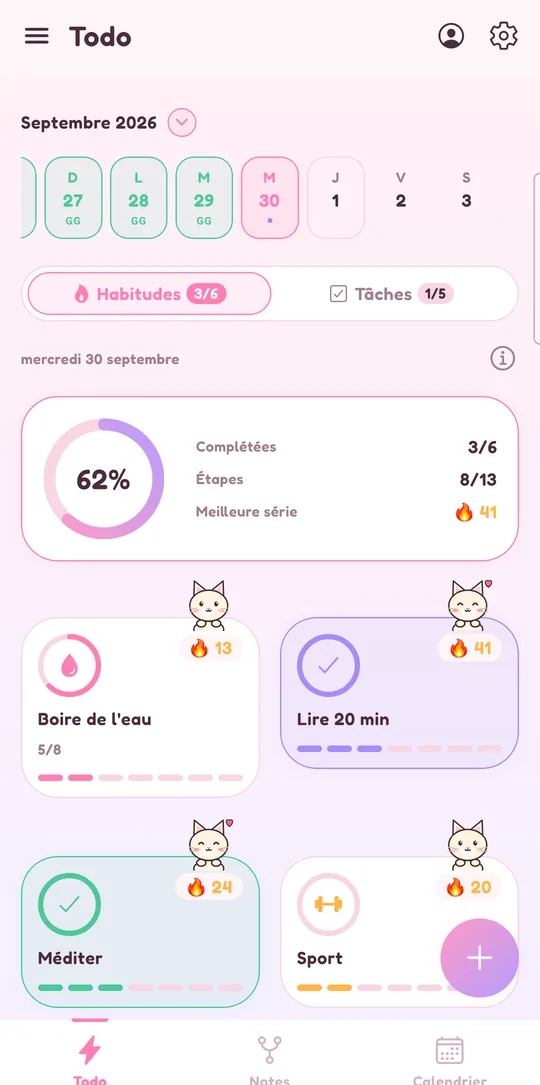
| Habits | A dedicated space: streaks, daily goal, several reminders | Habit tracking templates in its gallery, built on checkboxes in a database |
| Calendar | Google Calendar inside the app, in 7 views; create, edit, move and delete events | Notion Calendar, a separate free app: Google Calendar, Outlook and iCloud, with your Notion database items next to your events |
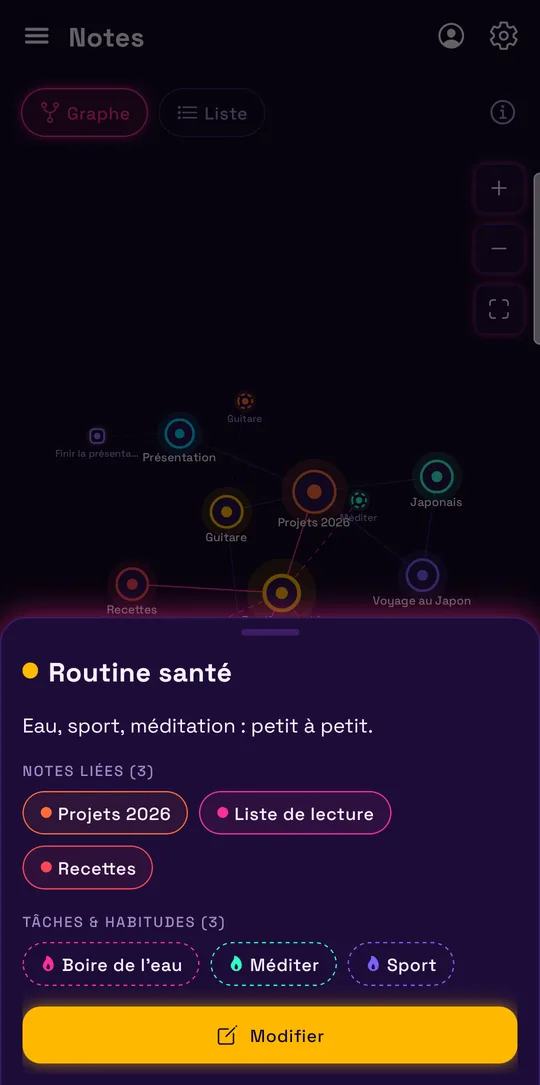
| Notes and docs | Plain-text notes, linked to each other, to tasks and to habits, as a graph or a list | Rich pages made of blocks, databases, wikis |
| Offline | Everything works offline, without an account | In the desktop and mobile apps, pages made available offline one by one, on each device; recent pages download automatically with Business |
| Working together | Groups of shared tasks with roles and per-member progress; notes stay personal | Shared pages and databases in a workspace, with guests |
| AI | None | Notion AI as a trial on Free and Plus; Notion Agent and AI meeting notes with Business |
| Devices | Android and web app (iPhone, iPad, Mac, PC in the browser) | Mac, Windows, iPhone, iPad, Apple Vision Pro, Android and browser |
Notion’s prices are in US dollars, as shown on its pricing page on November 7, 2026. They may change or vary by country. The links are at the bottom of this page.
When to keep Notion
Notion covers far more ground than Lumina. Keep it if this sounds like you:
- You write docs or keep a wiki. Pages made of blocks, subpages, a team wiki: Lumina has none of that. Its notes are plain text, with no formatting, images or tables.
- You need databases. Custom properties, views, dependencies: Notion lets you build a project tracker that fits you exactly. Lumina sorts tasks by day, with no projects or labels.
- Your team shares its knowledge. Notion is made for shared pages, with guests and version history. Lumina groups share tasks, not documents.
- You rely on AI. Notion offers Notion AI and, with Business, Notion Agent and meeting notes. Lumina has no AI.
- You want native apps everywhere. Notion has apps for Mac, Windows, iPhone, iPad and Android. Lumina isn’t on the App Store: on iPhone, Mac and PC, it’s the web app.
- Your calendar is in Outlook or iCloud. Notion Calendar connects to them; Lumina only handles Google Calendar.
When Lumina is the better fit
Lumina makes sense if you want a tool for your day, not a space to build:
- You want a to-do list that works out of the box. Date, time, priority, subtasks and recurrence are there from the start. Quick add picks up the date, time and priority you type.
- Your habits need reminders. The habit tracker has streaks, a daily goal and several reminders per habit, with no template to adapt.
- You want your calendar next to your tasks. Google Calendar shows up in Lumina in 7 views: Day, 3 days, 4 days, Week, Month, Year and Schedule. You create and move events without opening a second app.
- You’re often offline. Everything stays on your device and works offline, with no account and no pages to download ahead of time.
- Your notes should stay light. A note links to other notes, to a task or to a habit, and the graph shows those links at a glance.
- A game keeps you going. XP, levels, achievements and companions follow your progress. For school, see the student planner; for a class or a club, the shared to-do list.
Lumina comes in 6 languages: French, English, German, Spanish, Italian and Portuguese.
Moving from Notion to Lumina
Lumina doesn’t import Notion data (only Todoist and Google Tasks). You move by hand, which is a good chance to keep only what you use:
- In Notion, export what you want to keep: the “•••” menu of the page, then Export, in Markdown & CSV format. A database becomes a CSV file. That way you keep a copy of everything.
- Your tasks: recreate only the upcoming ones in Lumina, with quick add. Recurring tasks work like in Google Calendar.
- Your habit tracker: each row becomes a habit, with its days, daily goal and reminders. The free version tracks 3, so start with the ones that matter most.
- Your notes: paste the text of the pages you need into Lumina notes, then link them to each other and to your tasks. Formatting, images and tables don’t come across.
Your docs, wiki and databases can stay in Notion: the two apps sit side by side just fine.
Sources and date checked
Information about Notion checked on November 7, 2026, on its official pages and app store listings. Notion is a trademark of its owner, unrelated to Lumina.
Frequently asked questions
Can Lumina replace Notion?
For a to-do list, habit tracking and a calendar, yes. For docs, a wiki, databases or a team’s knowledge, no: Lumina has no rich pages and no databases. You can keep Notion for that and use Lumina for your day.
Can I import my Notion data into Lumina?
No. Lumina only imports from Todoist and Google Tasks. Export your Notion pages as Markdown and CSV to keep a copy, then recreate your upcoming tasks, your habits and the notes you need by hand.
Can Notion track habits?
Yes, with a template from its gallery: a database where you tick each day. Lumina has a dedicated space, with streaks, daily goals and several reminders per habit.
Does Lumina work offline?
Yes, fully and without an account. Google sign-in is for sync, Google Calendar and groups. In Notion, you make each page available offline on each device, unless recent pages download automatically with Business.
Is Lumina free?
Yes, with no time limit and no ads: 3 habits, 10 tasks per day, 1 group created and notes up to 2 nodes and 15 leaves in the graph. Student (€19.99 a year) lifts those limits.
Other ways to get organized
Compare with Todoist
Pricing, habits, calendar and import: what changes, and when to keep Todoist.
Compare with Habitica
A role-playing game or your whole day in one place: what changes, and when to keep Habitica.
Compare with TickTick
Tasks, habits, calendar and groups: what Lumina does differently, and when to keep TickTick.
Compare with Microsoft To Do
Outlook, habits, Google Calendar and sharing: what changes, and when to keep To Do.
Compare with Google Tasks
Calendar, import and habits: what changes, and when to keep Google Tasks.
Track your habits
Streaks, daily goals, reminders and widgets: a free habit tracker that keeps you going.
Bring tasks and calendar together
Your dated tasks and Google Calendar events in the same calendar.
Discover Lumina
Every feature, the 9 themes and the app’s pricing.
Ready to try it? It’s free.
No ads, no account required, on Android and in your browser.