Google Keep alternative: your notes, tasks and habits
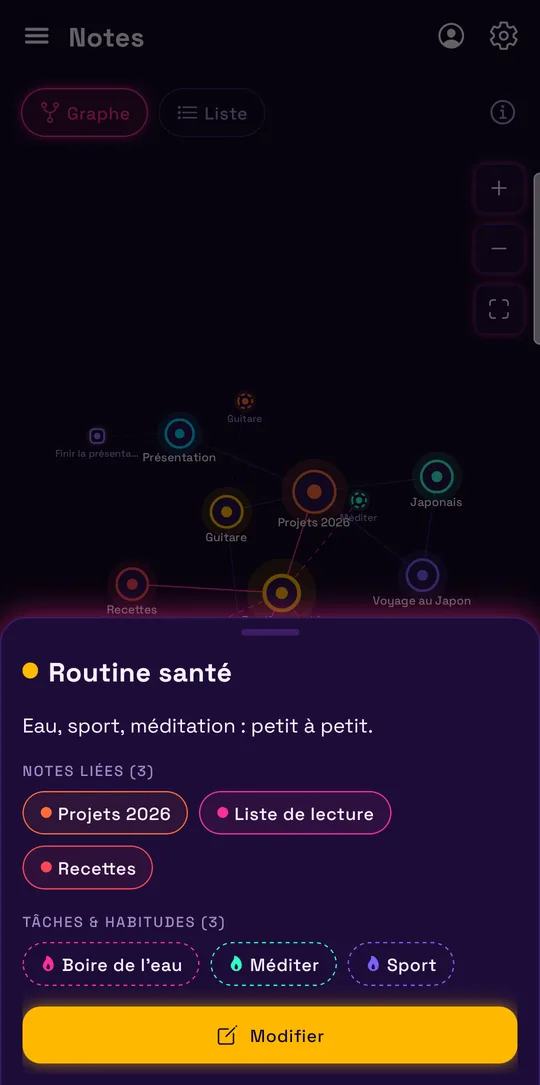
Google Keep is Google’s free notepad: notes, checklists, photos, drawings and voice memos, shared in one tap. Lumina isn’t just another notepad: it links your notes to your tasks, your habits and your Google Calendar. Here’s what changes, including what you’d lose by switching.
The short answer
If you mostly jot down quick ideas, photos, voice memos or shopping lists you share with your family, keep Google Keep: it’s free, fast and available on all your devices, iPhone included.
Lumina is worth a try if your notes turn into things to do: tasks with a date, a time and subtasks, habits to track, or a calendar to organize. Lumina imports your Keep notes and lists from Google Takeout: you can compare for a week without retyping anything.
Lumina and Google Keep, side by side
| Criterion | Lumina | Google Keep |
|---|---|---|
| Price | Free with no time limit and no ads: 3 habits, 10 tasks per day. Student: €2.49 a month or €19.99 a year. Pro: €4.99 a month or €39.99 a year | Free. The Gemini features (create a list, generate a title) need a Google AI plan or a Pixel phone |
| Notes | Text notes, linked to each other, to tasks and to habits, as a graph or a list | Text notes, checklists, images, drawings and transcribed audio recordings; up to 50 labels, colors, pins, archive |
| Tasks | Date, time, 3 priority levels, subtasks, recurrence; unfinished tasks move to the next day | Checklists with no date. A dated reminder becomes a Google Tasks task |
| Reminders | At a task’s time (or a few minutes before) and several times a day for a habit, sent by Lumina | Since 2025, reminders are Google Tasks tasks: alerts go through Google Calendar or Google Tasks. No more location reminders |
| Habits | Streaks, daily goal, reminders, statistics; 3 habits for free | No |
| Calendar | Google Calendar in seven views; create, edit, move and delete events | No calendar view; dated reminders show up in Google Calendar |
| Sharing | Groups with roles (creator, admin, editor, member) for shared tasks | A note can be shared with people, a Google group or your family group, who can edit it |
| Devices | Android and web app (iPhone, iPad, Mac, PC in the browser) | Android, iPhone and iPad (iOS 18 or later), Wear OS and keep.google.com |
| Offline | Yes, on Android and in the web app | On the mobile apps, not on a computer |
| Playful side | XP, levels, achievements, companions, decoration shop, 9 themes | Note colors and backgrounds |
The information about Google Keep comes from its official pages, checked on November 9, 2026. The links are at the bottom of this page.
When to keep Google Keep
Keep stays the better choice in these cases:
- You take notes as photos, drawings or by voice. Keep stores images, drawings and voice memos, which it transcribes. Lumina’s notes are text.
- You share lists with your family. A shopping list shared in Keep can be edited by several people live, with no account to create besides Google.
- You have an iPhone and want a native app. Keep is on the App Store. Lumina isn’t: on iPhone, it’s the web app.
- You want to sort everything by labels and colors. Keep organizes your notes with up to 50 labels. Lumina has no labels or folders.
- You want a free tool with no limit on numbers. Keep doesn’t limit the number of notes. Lumina’s free version limits tasks to 10 per day and habits to 3.
When Lumina is the better fit
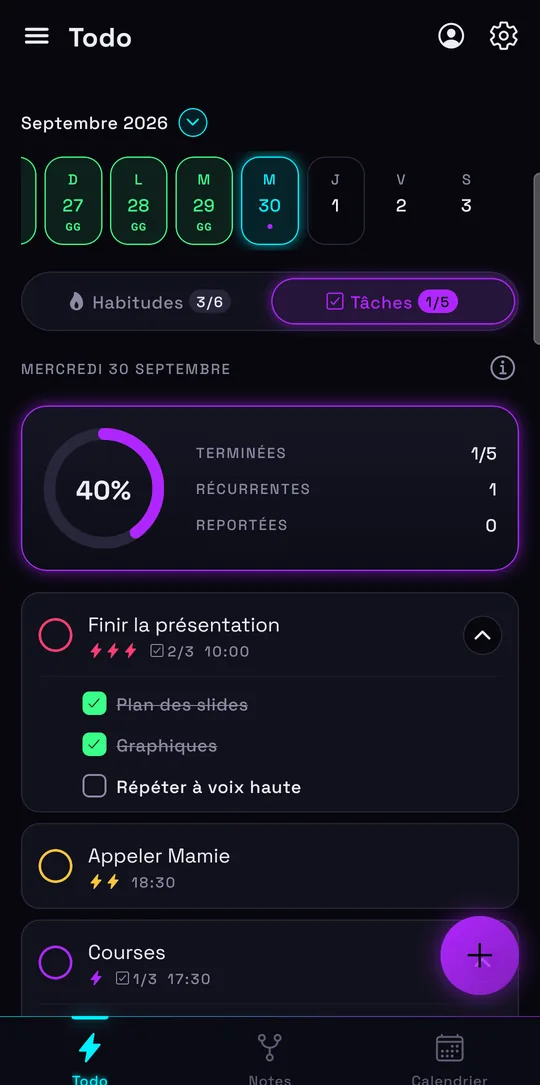
Lumina makes sense when your notes help you get things done:
- Your lists turn into tasks. In Lumina, a task has a date, a time, a priority, subtasks and a recurrence, and it moves to the next day as long as it isn’t done.
- You want to track habits. Streaks, daily goals, reminders and widgets: see the habit tracker.
- Your reminders need to ring in the app. Keep now sends its reminders through Google Tasks and Google Calendar. Lumina sends its own, for tasks as well as habits.
- You want your calendar alongside. Google Calendar shows up in Lumina in seven views, and you can create and edit your events there. Details on the to-do list and Google Calendar page.
- Your notes need to connect. A Lumina note links to other notes, to a task or to a habit, and the whole thing shows up as a graph.
- You run a class, a team or a club. Groups have roles and show who finished what.
Moving from Google Keep to Lumina
Lumina reads the Keep export made with Google Takeout. Here’s how:
- On takeout.google.com, deselect everything, check “Keep” and start the export. Google sends you a link to download an archive.
- Unzip the archive: it contains a Keep folder with one file per note.
- In Lumina, open Settings › Import from Todoist, TickTick, Notion, Google Tasks or Google Keep, then select all the .json files of the Keep folder. The pages and images next to them are ignored.
- Check what Lumina found, then import. On the same device, importing the same files a second time adds no duplicates.
Each text note becomes a Lumina note, with its labels added at the end of the note (#label). Each list becomes a task with no date, with its unchecked items as subtasks. Notes in the trash and fully checked lists aren’t imported; archived notes are. Images, drawings, recordings, colors and reminders don’t come across. Notes don’t count toward any limit; tasks count toward the free version’s 10 tasks per day.
Sources and date checked
Information about Google Keep checked on November 9, 2026, on Google’s official pages. Google Keep is a trademark of Google LLC, unrelated to Lumina.
Frequently asked questions
Can I import my Google Keep notes into Lumina?
Yes. Export Keep on takeout.google.com, unzip the archive, then select all the .json files of the Keep folder in Settings › Import. Notes become Lumina notes and lists become tasks with their subtasks.
Is Google Keep free?
Yes, on Android, iPhone and the web. Only its Gemini features need a Google AI plan or a Pixel phone, according to Google’s pages on November 9, 2026.
Do Google Keep reminders still work?
They’ve changed: since the second half of 2025, a Keep reminder is saved as a Google Tasks task and its alerts go through Google Calendar or Google Tasks. Location reminders are gone.
Does Lumina keep the photos and drawings of my Keep notes?
No. Lumina’s notes are text: the import brings over the title, text and labels, not images, drawings or recordings. Keep Keep if you mostly take notes as photos or by voice.
Does Lumina have an iPhone app like Google Keep?
Not on the App Store. On iPhone, open lumina-app.me/app in Safari, then “Add to Home Screen”.
Other ways to get organized
Compare with Todoist
Pricing, habits, calendar and import: what changes, and when to keep Todoist.
Compare with Habitica
A role-playing game or your whole day in one place: what changes, and when to keep Habitica.
Compare with TickTick
Tasks, habits, calendar and groups: what Lumina does differently, and when to keep TickTick.
Compare with Microsoft To Do
Outlook, habits, Google Calendar and sharing: what changes, and when to keep To Do.
Compare with Google Tasks
Calendar, import and habits: what changes, and when to keep Google Tasks.
Compare with Notion
Notion for your docs and wiki, Lumina for your to-do list, habits and calendar.
Compare with PrivacyNotes
An encrypted vault or an app to get organized together: what changes, and when to keep PrivacyNotes.
Track your habits
Streaks, daily goals, reminders and widgets: a free habit tracker that keeps you going.
Bring tasks and calendar together
Your dated tasks and Google Calendar events in the same calendar.
Discover Lumina
Every feature, the 9 themes and the app’s pricing.
Ready to try it? It’s free.
No ads, no account required, on Android and in your browser.