PrivacyNotes alternative: get organized alone or together
PrivacyNotes is an encrypted vault that brings together notes, tasks, passwords, journal, mood, medication, files and calendar. Lumina isn’t a vault: it’s an app to organize your day, your habits and your groups, with a playful side. Here are the differences, including what Lumina doesn’t do.
The short answer
If privacy comes first, keep PrivacyNotes: your notes are encrypted on your device, its code is public, and it also stores your passwords, your files and your health tracking. Lumina doesn’t encrypt your data end to end and doesn’t replace a password manager.
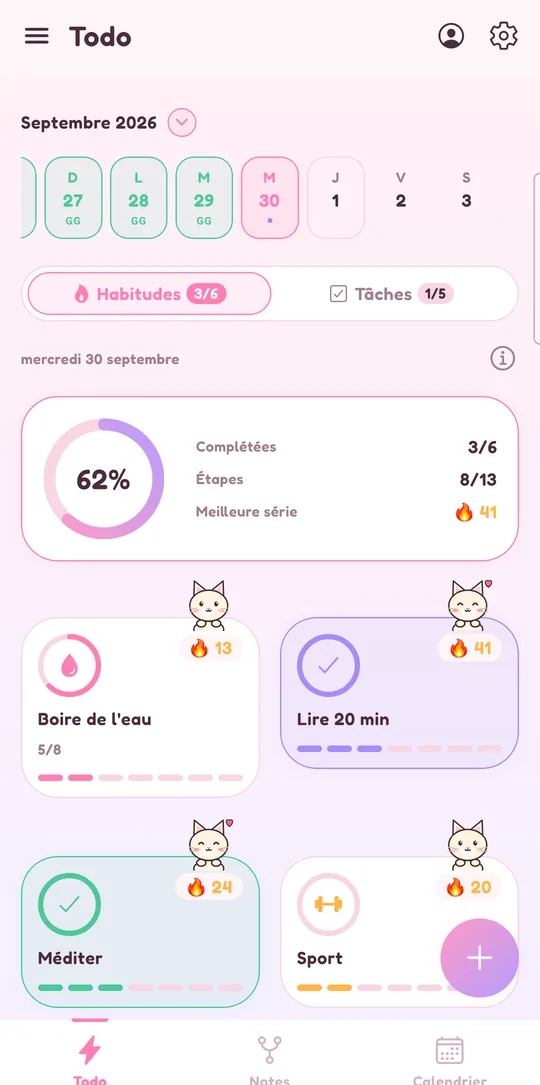
Lumina is worth a try if you want to get organized rather than archive everything: dated tasks with reminders, habits with streaks and goals, Google Calendar you can edit in the app, and above all groups for a class, a team or a club, something PrivacyNotes deliberately doesn’t offer.
Lumina and PrivacyNotes, side by side
| Criterion | Lumina | PrivacyNotes |
|---|---|---|
| Free version | No time limit, no ads: 3 habits, 10 tasks per day, 1 group created, sync on all your devices | No time limit: every feature, sync on 2 devices, 50 MB of storage |
| Paid plans | Student: €2.49 a month or €19.99 a year. Pro: €4.99 a month or €39.99 a year. Team (10 people) and Class (35 people) | Pro: $48 one-time payment (launch offer, $89 afterwards), extra storage billed yearly |
| Privacy | No ads, no data sold. Data synced on our servers, protected in transit but not end-to-end encrypted | On-device encryption (XChaCha20-Poly1305), open source code, servers in Switzerland, no trackers |
| Tasks | Date, time, 3 priority levels, subtasks, recurrence, reminders; unfinished tasks move to the next day | Checkboxes in notes, gathered in a Tasks view; a task note can have a day and a time |
| Habits | Streaks, daily goal, several reminders, statistics, widgets | Yes-or-no questions in the daily check-in; your own questions with Pro |
| Calendar | Google Calendar in seven views, editable in the app | The app’s own calendar (day, week, month); import of a Google Calendar export |
| Working together | Groups with roles (creator, admin, editor, member) and shared tasks | No collaborative editing, by design; sharing through a one-time link or an export |
| Extras | Notes linked as a graph, Pomodoro timer, XP, achievements, companions, 9 themes | Passwords, cards, SSH keys, files, contacts, bookmarks, journal, mood, medication, Markdown editor, command line |
| Devices | Android and web app (iPhone, iPad, Mac, PC in the browser) | Web, macOS, Windows, Linux, iOS, Android, browser extension |
| Sign-in | No account needed to use the app; Google sign-in to sync | Google, Apple, GitHub or a 12-word phrase; losing your phrase in self-custody means losing your notes |
The information about PrivacyNotes comes from its official site, checked on November 9, 2026, and may change. The links are at the bottom of this page.
When to keep PrivacyNotes
PrivacyNotes stays the better choice in these cases:
- You want end-to-end encryption. With PrivacyNotes, the server can’t read your notes. With Lumina, your synced data can be read by our server, even though we don’t sell it and show no ads.
- You write down sensitive things. Passwords, bank cards, medication, mood: PrivacyNotes is built for that. Lumina has no vault and no health tracking.
- You want native apps everywhere. PrivacyNotes has apps for Mac, Windows, Linux, iPhone and Android. Lumina only has a native app on Android.
- You’d rather pay once. PrivacyNotes Pro is a one-time payment. Lumina’s paid plans are subscriptions.
- You write in Markdown. PrivacyNotes edits .md files on your disk and can be used from the command line.
When Lumina is the better fit
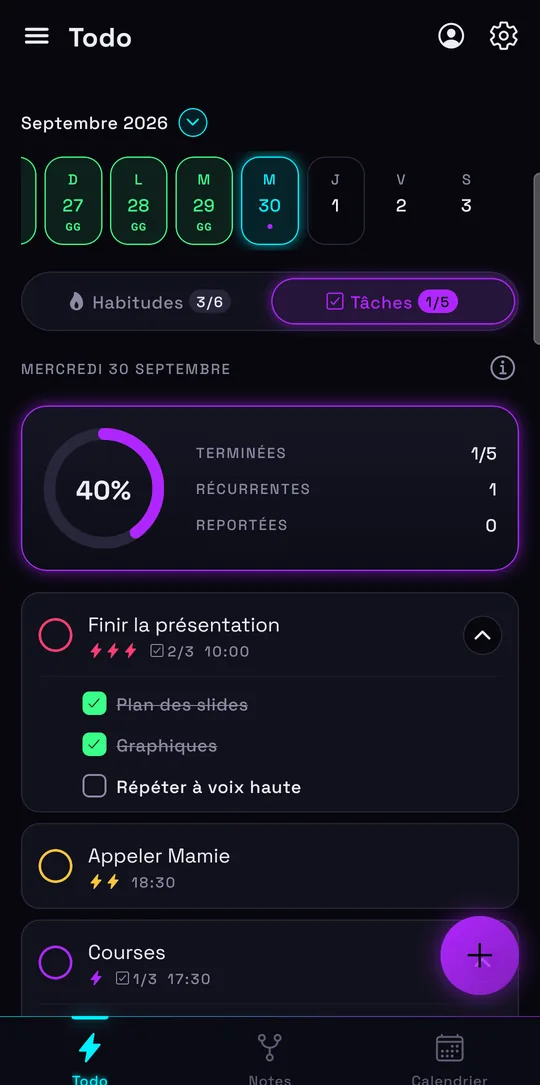
Lumina makes sense if you’re looking to get organized day to day:
- You work with others. A class, a team, a club or your family: Lumina’s groups have roles and show who finished what. PrivacyNotes doesn’t let several people work on a note.
- You want real habits. Streaks, daily goal, several reminders and Android widgets: see the habit tracker.
- Your tasks have a date and a time. Recurrence, priorities, subtasks, a reminder at the planned time, and what isn’t done moves to the next day.
- You live in Google Calendar. Lumina shows it in seven views and lets you create and edit your events. Details on the to-do list and Google Calendar page.
- The game keeps you going. XP, levels, achievements, companions that grow and a decoration shop.
- You don’t want a recovery phrase. Lumina signs in with Google; nothing is lost if you change phones.
Moving from PrivacyNotes to Lumina
Lumina doesn’t import PrivacyNotes files. For your upcoming tasks, recreate them with quick add: “tomorrow 6pm call grandma !!” sets the date, time and priority in one go. You can keep PrivacyNotes for your passwords and sensitive notes, and Lumina for your day and your groups: the two complement each other.
Sources and date checked
Information about PrivacyNotes checked on November 9, 2026, on its official site. PrivacyNotes is a trademark of its owner, unrelated to Lumina.
Frequently asked questions
Is Lumina end-to-end encrypted like PrivacyNotes?
No. Lumina protects your data in transit, doesn’t sell it and shows no ads, but our server can read what you sync. If you want end-to-end encryption, PrivacyNotes meets that need better.
Can several people share a list in PrivacyNotes?
Not to edit it together: PrivacyNotes shares a note through a one-time link or an export, and explains that collaborative editing would go against its design. Lumina has groups with roles and shared tasks.
Is PrivacyNotes free?
Yes, on 2 devices with 50 MB of storage. Pro costs $48 as a one-time payment, as a launch offer on November 9, 2026.
Can I import my PrivacyNotes notes into Lumina?
No. Lumina imports from Todoist, TickTick, Notion, Google Tasks and Google Keep. Your upcoming tasks are quick to recreate with quick add.
Do I have to choose between the two?
Not necessarily. PrivacyNotes keeps your passwords and sensitive notes; Lumina organizes your tasks, habits, calendar and groups.
Other ways to get organized
Compare with Todoist
Pricing, habits, calendar and import: what changes, and when to keep Todoist.
Compare with Habitica
A role-playing game or your whole day in one place: what changes, and when to keep Habitica.
Compare with TickTick
Tasks, habits, calendar and groups: what Lumina does differently, and when to keep TickTick.
Compare with Microsoft To Do
Outlook, habits, Google Calendar and sharing: what changes, and when to keep To Do.
Compare with Google Tasks
Calendar, import and habits: what changes, and when to keep Google Tasks.
Compare with Notion
Notion for your docs and wiki, Lumina for your to-do list, habits and calendar.
Compare with Google Keep
Notes, lists, reminders and Takeout import: what changes, and when to keep Keep.
Track your habits
Streaks, daily goals, reminders and widgets: a free habit tracker that keeps you going.
Bring tasks and calendar together
Your dated tasks and Google Calendar events in the same calendar.
Discover Lumina
Every feature, the 9 themes and the app’s pricing.
Ready to try it? It’s free.
No ads, no account required, on Android and in your browser.