An online Pomodoro timer that actually helps you focus
Start 25 minutes of focus, take 5 to breathe, repeat. Lumina’s Focus timer opens in your browser or on Android, lets you set every length, plays rain or white noise while you work, and stays linked to your to-do list.
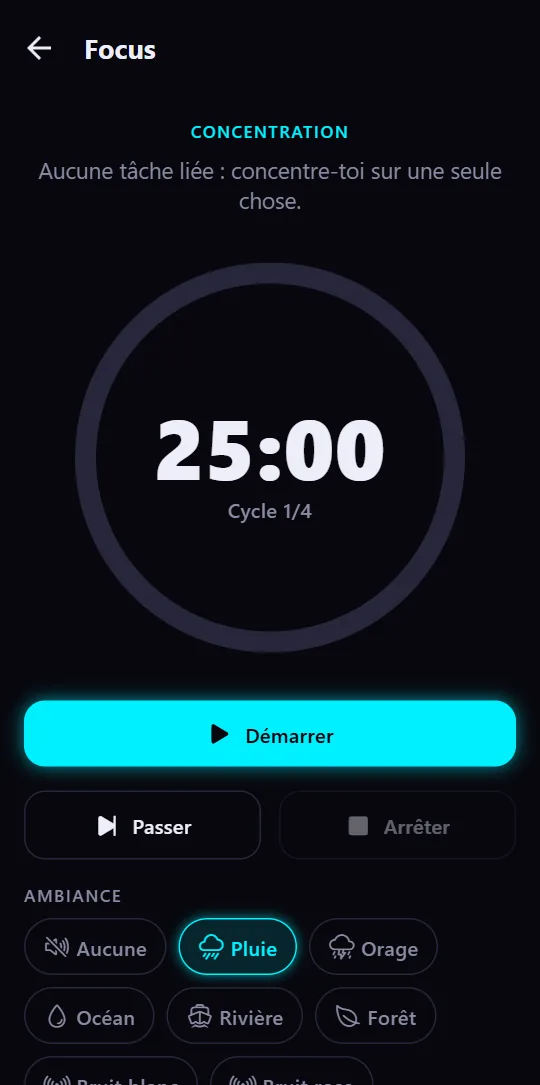
How the Pomodoro technique works
The idea is simple: work on one thing for a short, fixed time, then take a real break. Every fourth session, the break is longer. In Lumina:
- 25 minutes of focus on a single task.
- A 5-minute short break to stand up, drink, look away.
- After the 4th session, a 15-minute long break.
- The cycle starts again, and the timer shows where you are (“Cycle 2/4”).
You can pause, skip a phase or stop. Time left is read from the clock, so the timer stays right even when your phone goes to sleep.
Lengths that fit the way you work
25 minutes is a good start, not a rule. Some people want longer sessions to write or code, others shorter breaks while studying. In Lumina you set each phase:
- Focus: 5 to 90 minutes, in steps of 5.
- Short break: 1 to 30 minutes.
- Long break: 5 to 60 minutes, in steps of 5.
Want a 50/10 rhythm for a big session? Two taps, and your lengths are kept for next time.
Rain, ocean, white noise: sounds to help you focus
A steady background sound covers distracting noise and helps you get into the zone. The timer offers fifteen ambiences, looping without a gap, that you can mix:
- Lo-fi music
- Rain, storm and wind
- Ocean and stream
- Fireplace
- Forest, birdsong and night
- Café and train
- White, pink and brown noise
Each sound has its own volume. They keep playing while you move on to your tasks or notes, and mix with your own music instead of stopping it.
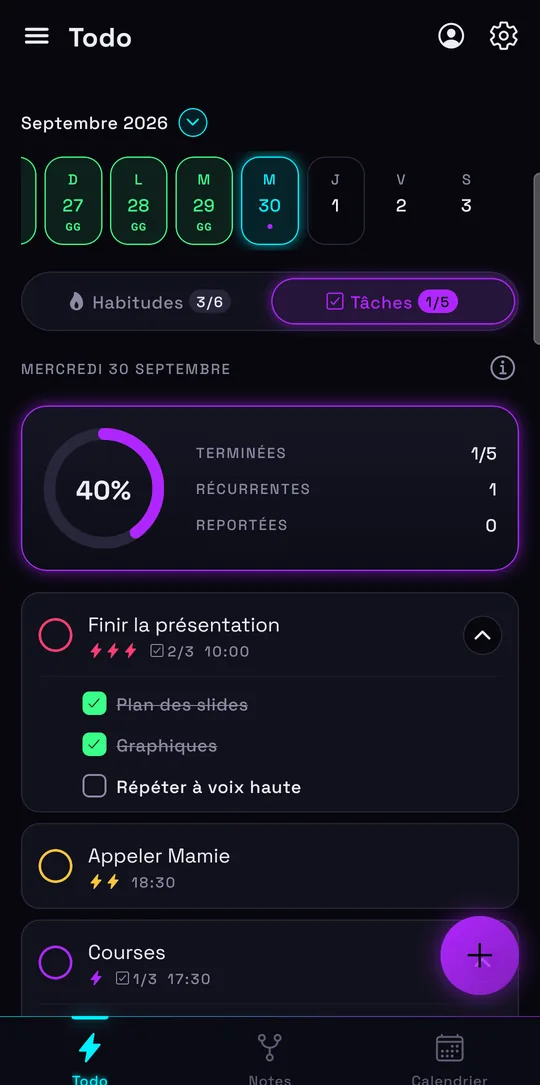
A Pomodoro linked to your to-do list
A timer alone tells you how long to work, not on what. In Lumina you start Focus right from a task: its name shows above the timer, and one button marks it done when the session ends.
At the end of each phase, a notification lets you know, even with the app in the background. The rest of your day is right there: your habits, your tasks and your Google Calendar.
Studying for exams? The student planner shows how to combine study sessions, homework and habits.
Free, no account, on the web and Android
Lumina’s Pomodoro timer is free, ad-free and has no session limit, in every plan. No account needed: open lumina-app.me/app/focus and start your first session.
On a computer, you can install the web app to open it in its own window. On Android, the Google Play app adds widgets and reminders for your habits.
Frequently asked questions
Is Lumina’s Pomodoro timer free?
Yes, entirely: adjustable lengths, ambient sounds and notifications are all in the free version, with no ads and no account.
Can I change the 25 minutes?
Yes. Focus goes from 5 to 90 minutes, the short break from 1 to 30 minutes and the long break from 5 to 60 minutes. Lengths change while the timer is stopped and are kept for next time.
Which ambient sounds are there?
Lo-fi music, rain, storm, wind, ocean, stream, fireplace, forest, birdsong, night, café, train, and white, pink and brown noise. Mix several, each at its own volume; they keep playing across the app.
Does the timer work in the browser?
Yes: open lumina-app.me/app/focus on a computer, tablet or phone. On Android it’s also in the Lumina app.
Other ways to get organized
Track your habits
Streaks, daily goals, reminders and widgets: a free habit tracker that keeps you going.
Organize your studies
Homework, studying and classes in a student planner linked to Google Calendar.
Share a to-do list
A group task list for your class, your team, your club or your family.
Bring tasks and calendar together
Your dated tasks and Google Calendar events in the same calendar.
Discover Lumina
Every feature, the 9 themes and the app’s pricing.
Ready to try it? It’s free.
No ads, no account required, on Android and in your browser.